
// open-source · self-hosted · Apache 2.0
The Enterprise Agent OS
Say it in plain language.
A team of agents delivers.
Describe a task in one sentence → OryxOS decomposes it → assembles a team of agents → they collaborate → the result is delivered. Today: define an agent in one sentence — memory, 24 built-in tools, MCP, skills, scheduling, and a full audit trail included — and it goes live instantly. Self-hosted on your own K8s or servers, data stays home. So every company can run its own agents, in plain language.
Runtime for one. OS for many.
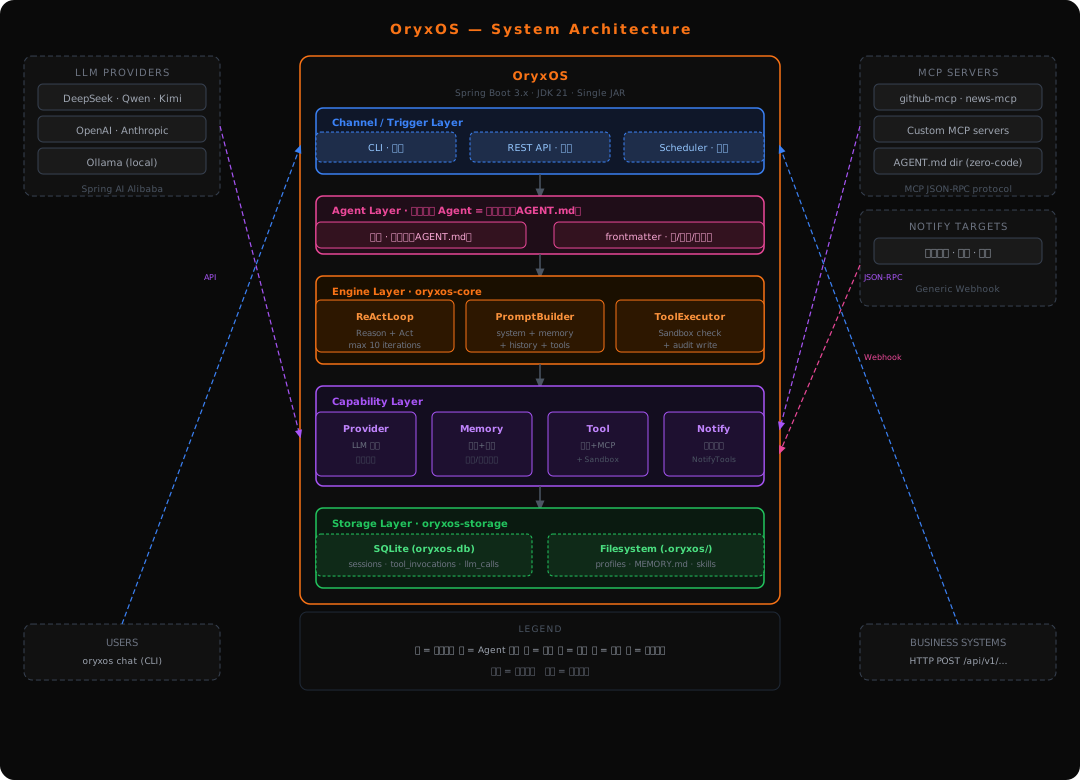
One directory. Unlimited agents.
One Directory = One Agent
An agent is a directory: AGENT.md = frontmatter (its profile) + a body of instructions, plus optional skills/ and scripts/. Create via REST, generate from one sentence with an LLM, or drop in a directory — WorkspaceWatcher makes it live with no restart.
.oryxos/agents/ops-agent/
├── AGENT.md        # frontmatter + task body
├── skills/*.md     # on-demand sub-instructions
└── scripts/        # on-demand shell scripts

# Drop the dir in → WorkspaceWatcher registers it live
# Or: POST /api/v1/agents (create / generate / edit)Dynamic Multi-Provider Routing
Providers live in SQLite with runtime CRUD — add, edit, remove anytime. Agents are provider-agnostic; explicit name → ChatModel routing stays correct, and the model rebuilds when its key or base URL changes.
# Providers are runtime-mutable, stored in SQLite
POST /api/v1/providers
{ "name": "deepseek", "apiKey": "${DEEPSEEK_API_KEY}",
  "baseUrl": "https://api.deepseek.com" }

# An agent just references one by name
provider:
  name: deepseek        # → explicit ChatModel map
model: deepseek-chatSelf-implemented ReAct Loop
Full control over Reason → Act → Observe — synchronous execution on virtual threads, wrapped by no external agent framework. Vendor protocol differences are absorbed by an adapter layer; tool execution stays fully in-house and inspectable.
User message
  → PromptBuilder: system + memory + history + tools
  → ProviderService.call()
  → [Tool call?]
      → SandboxChecker whitelist
      → ToolExecutor.execute()
      → write tool_invocations audit
      → append result → loop
→ [Final reply] → returnLayered Memory System
Session memory plus per-agent long-term memory (.oryxos/agents/<name>/MEMORY.md, keyword search, timestamped). Auto-injected into every system prompt so agents stay consistent across sessions — with a clear upgrade path to vector search.
# Agent saves a preference
Tool: save_memory
Input: {"content": "Weekly report goes out every Friday 5pm"}

# Persisted per-agent, auto-injected next turn
# .oryxos/agents/ops-agent/MEMORY.md

Tool: recall_memory
Input: {"query": "user preferences"}Sandboxed Tools + MCP
Built-in file / shell use path and command whitelists; HTTP is split (reads: default allow + SSRF; writes: domain whitelist). No SecurityManager; manageable at runtime. Three-tier plugins: zero-code SKILL.md → custom MCP server → native @Tool. Notify channels addressed by name.
# Whitelists, not SecurityManager
shell.allowed_commands: [ls, cat, python3]
http.allowed_domains:   ["*.github.com"]

# Manage at runtime
POST /api/v1/sandbox/whitelist/SHELL
# Extend via MCP server or native @ToolWeb Admin Console
A Vue 3 + Vite console at /admin/ (same theme as this site): agent management with one-sentence generation, Provider / Notify-channel CRUD, scheduled tasks, workspace file browser, and memory views. Audit tables llm_calls and tool_invocations are written from day one.
❯ oryxos serve --port 8080

/api/v1/**     REST API (unified envelope)
/admin/        Web admin console
/swagger-ui OpenAPI docsEnterprise-ready scenarios
DevOps Agent
Reads logs, runs shell commands, monitors services. Remembers infra preferences across sessions.
Zero-code PR Digest
Write a SKILL.md and connect a GitHub MCP server — daily PR summaries with zero code.
Customer Service
Handles queries via REST API, recalls past interactions, escalates when needed.
Knowledge Management
Indexes internal docs, answers questions, persists learned facts to long-term memory.
Code Review Agent
Reviews PRs via MCP, comments on issues, tracks review patterns in memory.
HR Assistant
Answers HR queries, schedules interviews, retrieves policy docs via REST API.
Alert Monitor
Polls monitoring APIs, analyzes anomalies with LLM, sends structured reports.
Multi-Agent Collaboration
Multiple agents share one OryxOS instance, each with its own profile, tools, and memory.
Built to grow. Phase by phase.
Single-node Runtime Kernel
- 5 core capabilities
- Multi-agent on one node
- REST API exposure
- MCP tool protocol
Distributed Foundation
- Stateless node design
- External state store
- Multi-replica horizontal scale
Cross-node A2A Collaboration
- Agent discovery & registry
- Cross-agent task delegation
- A2A protocol standard
From one agent to a fleet.
Initialize the workspace, configure an LLM provider, and start chatting. Your first agent in under 5 minutes — scale to a fleet whenever you're ready.
# 1. Initialize the workspace
❯ oryxos init

# 2. Configure your LLM provider
❯ export DEEPSEEK_API_KEY=your-key-here

# 3. Start your first agent
❯ oryxos chat --profile ops-agent

# Or launch the REST API
❯ oryxos serve --port 8080