
ReAct Loop
OryxOS implements the ReAct (Reason + Act) algorithm entirely from scratch — a few dozen lines of Java in ReActLoop.java. There is no framework delegation, no black-box agent abstraction. Every iteration is observable and auditable.
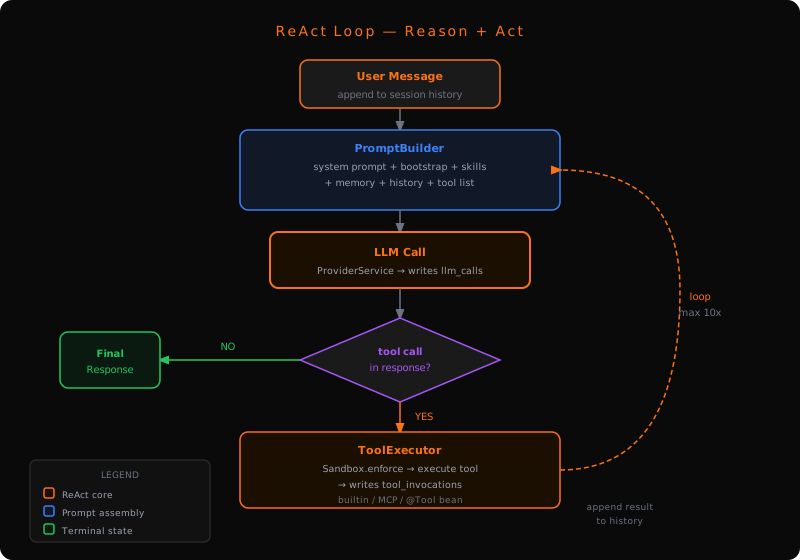
How the loop works
Seven steps, repeated up to max_iterations times (default: 10):
- Receive — user message arrives via a channel (CLI, HTTP, etc.)
- Append — message is appended to the
Sessionconversation history in SQLite - Build prompt —
PromptBuilderassembles a four-part prompt (see below) - Call LLM —
ProviderServicesends the prompt to the configured provider - Inspect response — check whether the model returned a tool call or a final answer
- No tool call → return the response to the caller. Loop ends.
- Tool call →
ToolExecutorruns the tool, threads the result back as a structured tool message, goes back to step 3
User message
  → Append to Session history                          [SessionManager → SQLite]
  → PromptBuilder assembles prompt
  → ProviderService calls LLM                          [writes llm_calls table]
  → No tool call  → return final response
  → Tool call     → ToolExecutor
                      → SandboxChecker whitelist check
                      → execute (in-process or JSON-RPC to MCP server)
                      → write tool_invocations table
                      → append result to history
  → repeat (max 10 iterations by default)
What gets injected into the prompt
PromptBuilder assembles the prompt from four sources in this order:
| # | Part | Source | Owner |
|---|---|---|---|
| 1 | System prompt — the Agent's AGENT.md body + Bootstrap files (AGENTS.md, SOUL.md, USER.md) | Filesystem | ContextLoader |
| 2 | Long-term memory — full text of the Agent's MEMORY.md (truncated at 4 000 chars) | .oryxos/agents/<name>/MEMORY.md (falls back to .oryxos/memory/MEMORY.md) | MemoryService |
| 3 | Conversation history — last max_history_turns turns, as structured messages (including prior assistant tool calls and tool results with their ids) | SQLite sessions.messages_json | SessionManager |
| 4 | Available tools — JSON Schema for each tool the Agent exposes | ToolRegistry | ToolRegistry |
Sub-instructions (skills/*.md) and scripts (scripts/) inside the Agent directory are not pre-injected — the body directs the model to read them on demand via read_file / shell.
The prompt is rebuilt on every iteration. Tool calls and their results are carried through the provider as structured tool_call / tool_result messages — assistant tool calls and tool responses matched by id — rather than being flattened into plain text. If a tool result changes what the model should do next, the rebuilt prompt captures it.
ToolExecutor
ToolExecutor is responsible for everything that happens between the LLM deciding to call a tool and the result being added to the conversation:
- Parse — extract tool name and arguments from the model's response
- Look up — find the
OryxToolimplementation inToolRegistry - Validate —
SandboxCheckerchecks the call against the configured whitelists - Execute — built-in tools run in-process; MCP tools are forwarded over JSON-RPC
- Audit — write a row to
tool_invocations(success, duration, input, result) - Return —
ToolResultis appended to conversation history as a structured tool-result message carrying the originating tool-call id, so the next LLM call sees it as a proper tool response rather than free text
If the tool fails and ToolResult.retryable is true, the error message is still appended to history so the model can try a different approach on the next iteration.
Key constraints
max_iterations — set per-Agent in the AGENT.md frontmatter settings (default 10). Prevents runaway loops. When the limit is hit the loop stops and returns whatever the last LLM response was.
settings:
  max_iterations: 10
  max_history_turns: 20
Context window management — long-term memory is truncated at 4 000 characters (LongTermMemory.truncateIfNeeded()), keeping the most recent content. Conversation history is capped at max_history_turns. Neither truncation is silent: the PromptBuilder logs the actual injected lengths.
Synchronous execution — the entire loop is synchronous and blocking. Java 21 Virtual Threads handle concurrency at the HTTP/channel layer. No Reactor, no CompletableFuture, no callbacks inside the loop.
Spring AI tool execution is disabled — ChatClient automatic tool execution is explicitly not used. If it were enabled, tools would execute twice (once by Spring AI, once by ToolExecutor). ProviderService calls chatModel.call(prompt) directly and hands the raw ChatResponse to the loop.
// Wrong — Spring AI would auto-execute tools
chatClient.prompt(prompt).tools(tools).call().content();

// Correct — raw call, loop inspects and executes tool calls itself
ChatResponse response = chatModel.call(new Prompt(messages, options));
What is not in core phase
The following are planned for the extension phase and are not implemented in the core loop:
- Parallel tool calls — multiple tools called simultaneously in one iteration
- Streaming responses — SSE or WebSocket streaming of partial tokens
- Loop-level retry with backoff — currently a failed LLM call surfaces the error immediately
- Branching / sub-agent delegation — single-agent linear loop only in core phase